
Unlimited Usenet + Extras:
1. UseNetServer - $10.00
2. Newshosting - $9.99
3. NewsDemon - $9.99
Unlimited Usenet-Only:
1. Easynews - $9.95
2. ThunderNews - $10.49
3. Astraweb - $11.00
Unlimited Annual Offers:
1. UseNetServer - $95
2. Newshosting - $99
3. Astraweb - $96
1. UseNetServer
2. Newshosting
3. NewsDemon
4. Easynews
5. Astraweb
6. ThunderNews
7. NewsgroupDirect
8. MaximumUsenet
9. Giganews
10. Ngroups
1. Easynews - 10 GB
2. Newshosting - 30 GB
3. UseNetServer - 10 GB
4. NewsDemon - 15 GB
5. Ngroups - 5 GB
- UseNetServer :
1,375
- Newshosting :
1,375
- NewsDemon :
1,375
- Astraweb :
1,374
- Easynews :
1,330
- ThunderNews :
1,375
- NewsgroupDirect :
1,374
- MaximumUsenet :
1,320
- Giganews :
1,385
- Ngroups :
1,200
- Best Usenet Providers
- Cheap Usenet Access
- Best Usenet Packages
- Unlimited Usenet Access
- Personal VPN Services
- Compare 100+ Providers
Select the files that you are going to post. Then right-click to bring up menu.
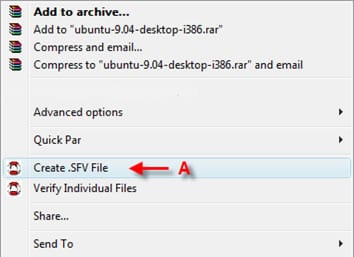
A – Select “Create .SFV File.”
Another window will appear asking you to select 2 options.
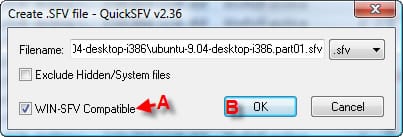
A –Make sure to check WIN-SFV Compatible as an option.
B – Click on OK when done.
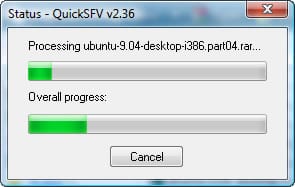
Clicking Okay will start the SFV creation process. You will see a progress bar appear updating you of the process.
When it is complete, QuickSFV will give you an update letting you know that the .SFV has been created.
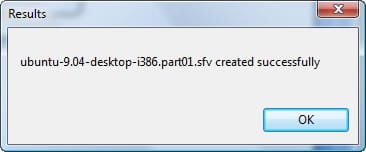
Click OK to close out window. You have just created an .SFV file that can be uploaded to Usenet with the rest of the binary archive.
Now on to step 4 - Create an NFO file
Usenet Providers | Free Usenet Access | Usenet Newsgroup Reviews | VPN Services
© 2006-2012 NewsgroupReviews.com | All Rights Reserved | Privacy Policy | Contact
