
This guide will walk you through setting up News Rover to work with UseNetServer news servers. If you haven’t already signed up for Usenet access then take a look at UNS. They offer days of binary retention, connections, SSL encryption and servers in the US and Europe. NGR visitors receive a special price of $10/mo. or $95/yr.
Download News Rover
Visit the News Rover newsreader homepage (Newsrover.com) to download the latest version of the client.
Install News Rover
The installation is simple. Choose a folder for the program to install and whether or not you want desktop or quick launch icons.
Configure NewsRover for UseNetserver
The first time you open News Rover the configuration wizard appears.
Figure 1 – News Rover Initial Server Setup
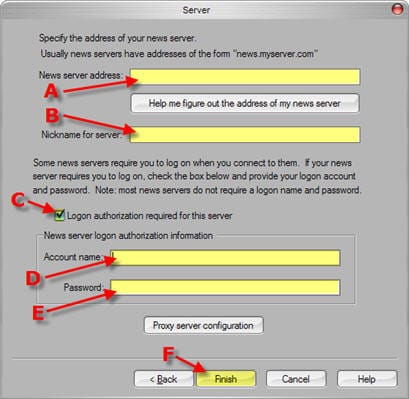
Enter the information as follows:
A – News server address: news.usenetserver.com, secure.usenetserver.com (SSL) or text.usenetserver.com (text-only)
B – Nickname for server: anything you want
C – Check “Logon authentication required for this server”
D – Enter Username (provided in email)
E – Enter Password (provided in email)
F – click Finish
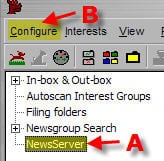
Once News Rover is up you will want to highlight NewsServer (whatever you nicknamed the server) on the left and then click configuration on the top menu as follows:
Figure 2 – News Rover Configuration Menu
Now you can enter in the server information in the screen below:
Figure 3 – News Rover (Server Properties)
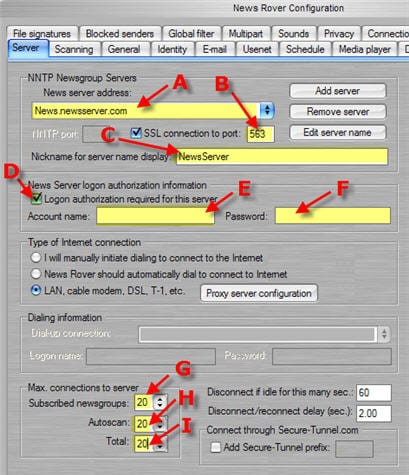
The server properties screen includes everything you need to get up and running. Simply enter the information as follows:
A – News server address: news.usenetserver.com, secure.usenetserver.com (SSL) or text.usenetserver.com (text-only)
– Check “SSL connection” for secure access.
B – Port: use port 443, 563 or 8080 for secure or port 119, 23, 25, 3128, 8000 or 9000 for standard connections.
C – Nickname for server: anything you want
D – Check “Logon authentication required for this server”
E – Enter Username (provided in email)
F – Enter Password (provided in email)
G, H, I – Max Connections: UseNetServer supports up to 20 connections.
It’s that simple to configure News Rover for UseNetServer. Enjoy!