
Unlimited Usenet + Extras:
1. UseNetServer - $10.00
2. Newshosting - $9.99
3. NewsDemon - $9.99
Unlimited Usenet-Only:
1. Easynews - $9.95
2. ThunderNews - $10.49
3. Astraweb - $11.00
Unlimited Annual Offers:
1. UseNetServer - $95
2. Newshosting - $99
3. Astraweb - $96
1. UseNetServer
2. Newshosting
3. NewsDemon
4. Easynews
5. Astraweb
6. ThunderNews
7. NewsgroupDirect
8. MaximumUsenet
9. Giganews
10. Ngroups
1. Easynews - 10 GB
2. Newshosting - 30 GB
3. UseNetServer - 10 GB
4. NewsDemon - 15 GB
5. Ngroups - 5 GB
- UseNetServer :
1,743
- Newshosting :
1,743
- NewsDemon :
1,743
- Astraweb :
1,742
- Easynews :
1,700
- ThunderNews :
1,743
- NewsgroupDirect :
1,742
- MaximumUsenet :
1,320
- Giganews :
1,753
- Ngroups :
1,200
- Best Usenet Providers
- Cheap Usenet Access
- Best Usenet Packages
- Unlimited Usenet Access
- Personal VPN Services
- Compare 100+ Providers
Go to the 7zip home page and select the version of 7 Zip that you would like to download.
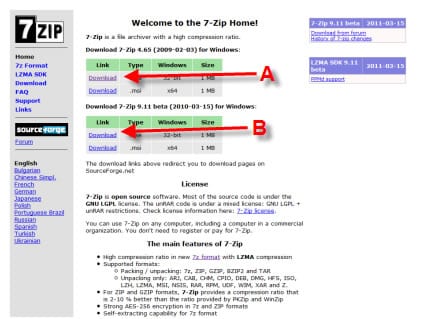
In our case the following version options applied:
A - Download 7zip 4.65 for Windows
B – Download 7zip 9.11 Beta for Windows
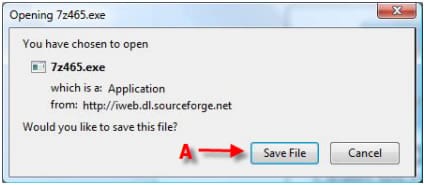
A – Click “Save File”
If the Z-Zip install file doesn't autonatically run then manually open the executable file for Zzip.

A new window will then appear asking you in what directory do you want to install the 7Zip program. Select the preferred folder that you want to save the 7Zip program. Click “Install” after you have selected the directory.
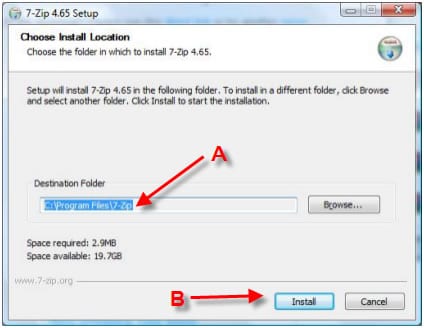
A – Select the folder where you would like to Save the 7-zip program
B – Click “Install” after you choose an install directory.
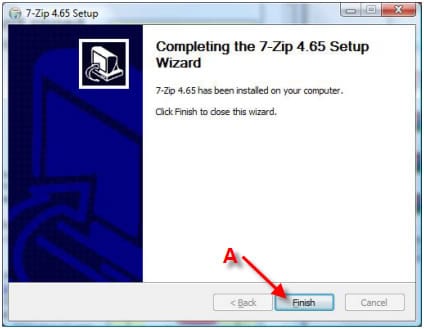
A – After 7zip finishes installing, click “finish”
For more help refer to other NGR 7-zip guides:
1. 7-Zip Download and Installation Guide
2. How to Extract / UnRAR with 7-Zip
3. How to Use 7-Zip to Split / Archive a File
4. How to create an Archive / Zip with 7-Zip
Usenet Providers | Free Usenet Access | Usenet Newsgroup Reviews | VPN Services
© 2006-2013 NewsgroupReviews.com | All Rights Reserved | Privacy Policy | Contact
